
Impossible Travel Detection Workflow
Overview
Out-of-the-box impossible-travel alerts in Microsoft Sentinel are notoriously noisy. Corporate VPN exits, cloud-hosted clients, mobile carriers that hop regions mid-session, and legitimate business travel all produce sign-in patterns that look like compromise. Triaging these manually was burning analyst hours on false positives, and the genuine cases were getting buried in the noise.
This workflow handles the routine 90% automatically: it enriches each alert with context an analyst would otherwise hunt down by hand, filters out the obvious legitimate-travel cases before contacting anyone, evaluates the user’s response, and applies a Conditional Access action when warranted. Only the cases that genuinely require human judgment escalate to the SOC, and when they do, they route to an admin who is awake.
Detection Logic
The workflow triggers on a Microsoft Sentinel incident created from Microsoft Defender’s built-in Impossible Travel alert. No custom analytic rule, no UEBA tuning, no rule-level suppression: Defender produces the detection, Sentinel ingests it as an incident through the Microsoft 365 Defender data connector, and the Logic App attaches as a playbook on the “incident creation” trigger.
What this means in practice:
- The detection is Defender’s. Signal tuning happens in the Defender alert policy. Sentinel acts as the routing and orchestration layer.
- All triage logic lives in the Logic App. Every branch sits inside the workflow itself, from exclusion conditions and OOO handling through regional routing, manager fallback, and incident closure.
- The first guard is a basic identity check. If the account entity passed in by Sentinel can’t be resolved to a valid user (empty
displayNameon the user profile), the workflow terminates immediately and writes a justification back to the incident. This prevents the rest of the enrichment from running against a stale or malformed reference.
Workflow Diagram
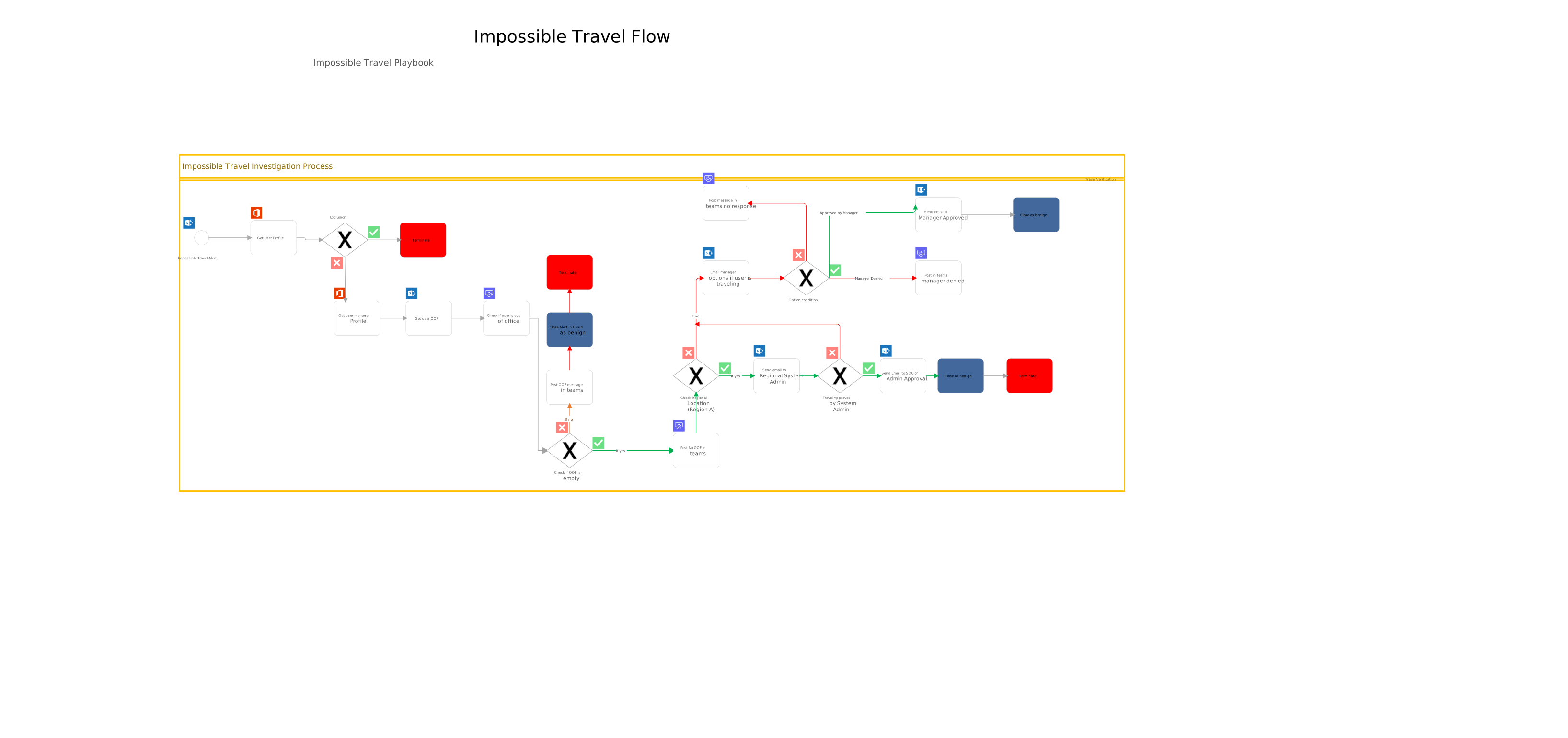
Enrichment & Triage
The workflow pulls the context an analyst would otherwise gather manually:
- User risk score and recent risky-sign-in history from Entra ID Identity Protection
- Recent sign-in patterns across the last 7 and 30 days for travel context
- Device compliance state for both source IPs
- MFA history on the impossible-travel session itself
- ASN reputation and geolocation for the source IPs
- Out of Office status from the user’s mailbox
This package lands in the Sentinel incident comments and in the message sent to the user, so by the time anyone reads anything, the surrounding context is already there.
Pre-Contact Filter
Before the workflow contacts the user, it evaluates the OOO data it just gathered. If Out of Office is set and the destination region is consistent with the impossible-travel signal, the alert is closed as expected travel with a logged justification. No one is paged, the analyst queue stays clean, and the user is not interrupted on PTO. This single pre-contact check eliminates a meaningful share of legitimate-travel alerts that would otherwise consume cycles downstream.
Response Actions
If the pre-contact filter does not close the alert, the workflow follows one of four paths based on the user’s response and the surrounding signal:
- User confirms the sign-in and signals are clean → close the incident as benign, log the outcome to Sentinel.
- User denies, or signals are clearly suspicious regardless of response → invoke a named Conditional Access policy. Depending on severity, the policy revokes active sessions, requires MFA on next sign-in, or blocks outright. Action lands inside minutes.
- User does not respond within 30 minutes → the workflow exits the wait loop on a defined timeout path rather than hanging indefinitely. The session is treated as unverified and routed to the same Conditional Access action as an explicit denial. This guarantees every detection reaches a defined end state, which matters both for audit and for catching genuine compromises where the user is not in a position to respond.
- Signals strongly suggest compromise regardless of the user’s response → escalate to the SOC channel with the enrichment summary attached. The analyst arrives with full context, not a blank ticket.
The auto-handle vs. escalate boundary was tuned over several weeks of running the workflow in observation mode, watching what was getting through and what was over-rotating, before letting it act independently.
Time-Zone-Aware Escalation
When the workflow does escalate, it does not page a single global admin queue. It reads the affected user’s officeLocation attribute and routes the alert to the regional admin whose working hours cover that user’s time zone. This is a deliberate design choice: an alert that fires at 02:00 in one region but lands on an admin who is actively working in another region gets a response in minutes instead of waiting for the night-shift admin to come online. The routing is implemented as a switch on officeLocation, which means the same architecture drops into any multi-region environment: replace the location values and admin contacts, and the workflow logic itself does not change.
Outcomes
- Faster response. Mean time from alert to first user contact dropped from analyst-paced hours to workflow-paced minutes. For genuine compromises, the Conditional Access action lands before the attacker has session time to act on.
- Sub-hour escalation regardless of when the alert fires. Routing to a regional admin in active time-zone coverage means escalations do not sit overnight waiting for the next shift. Genuine compromises get attention while the session window still matters.
- Reduced analyst workload. The routine cases (legitimate travel, known VPN, mobile carrier hops) close automatically. The analyst review queue shrank substantially, freeing capacity for genuinely ambiguous cases and other detection work.
- Better experience for travelers. Frequent travelers used to be repeatedly questioned by the SOC. Now the workflow contacts them directly, they confirm in seconds, and there is a logged trail. No SOC ticket, no analyst time.
- Cleaner incident records. Every action the workflow takes is written back to the Sentinel incident, giving a clean audit trail for compliance and a feedback loop for tuning the detection over time.
Lessons Learned
- Suppress at the rule, not the workflow. Filtering inside the Logic App means firing alerts you ignore. That looks fine until someone audits why an obvious VPN signal “was not acted on” for a quarter.
- Executive travel is its own pattern. Some users travel constantly. Tier the policy (looser for known travelers) or accept that those users will benefit less from this control. Do not pretend the workflow can normalize their pattern away.
- User-prompt fatigue is real. Prompt too often and people click through without reading. The rule has to be tight enough that the prompt itself signals “this matters, look closely.”
- Session revocation has user impact. Revoking sessions logs the user out of every active session. Match the action to the signal severity. Do not over-rotate on weak evidence.
- Where your admins are awake matters as much as how the workflow is written. A defensible escalation path has to account for who is on shift when the alert fires, not just whether the logic is correct. Routing on the affected user’s region keeps response times reasonable even when alerts fire outside any one admin’s working hours.
- The auto-handle line will be wrong on day one. Plan for tuning runs. The SOC should own the criteria over time.
Code & Templates
The full sanitized Logic App lives in Tech-Cookbook / security-operations / impossible-travel. The export is already an ARM template, so it can be parameterized and deployed declaratively. The pieces below are the callouts worth knowing when reading through it.
Sentinel incident trigger
The workflow fires on a Sentinel incident-creation event:
"triggers": {
  "Microsoft_Sentinel_incident": {
    "type": "ApiConnectionWebhook",
    "inputs": {
      "host": {
        "connection": {
          "name": "@parameters('$connections')['azuresentinel']['connectionId']"
        }
      },
      "path": "/incident-creation"
    }
  }
}
The Defender Impossible Travel alert flows into Sentinel through the Microsoft 365 Defender data connector and is automatically wrapped in a Sentinel incident, which is what this trigger picks up. No analytic rule sits between them.
Early exclusion: invalid user entities
Sentinel sometimes hands the playbook an account entity that does not resolve to a real user. The workflow exits immediately rather than burning enrichment cycles on a dead reference:
"Exclusion": {
  "type": "If",
  "expression": {
    "or": [
      { "equals": [ "@body('Get_user_profile_(V2)')?['displayName']", "" ] }
    ]
  },
  "actions": {
    "Terminate":       { "type": "Terminate", "inputs": { "runStatus": "Cancelled" } },
    "Update_incident": { "type": "ApiConnection", "...": "writes justification back" }
  }
}
OOO pre-contact filter
After enrichment (manager, user profile, mail tips), the workflow checks the user’s Out-of-Office status via getMailTips. If automaticReplies is empty, the main flow continues. If OOO is set, the alert closes as expected travel:
"Condition": {
  "type": "If",
  "expression": {
    "and": [
      {
        "equals": [
          "@empty(outputs('Get_mail_tips_for_a_mailbox_(V2)')?['body/value'][0]['automaticReplies'])",
          true
        ]
      }
    ]
  },
  "actions": { "Scope": { "...": "main flow: regional routing, manager fallback" } },
  "else":    { "actions": { "For_each": { "...": "post 'user is OOF' notice + close incident" } } }
}
Regional admin routing
When the main flow runs, the workflow routes the alert to the regional admin whose working hours cover the affected user’s location. The switch keys off the officeLocation from the user profile:
"Regional_Verification": {
  "type": "Switch",
  "expression": "@body('Get_user_profile_(V2)')?['officeLocation']",
  "cases": {
    "RegionA": {
      "case": "RegionA",
      "actions": {
        "Post_Option_to_RegionA_Admin": { "type": "ApiConnectionWebhook", "...": "Teams adaptive card with approve/deny" },
        "RegionA_Choice":                { "type": "Switch", "...": "branches on admin response" }
      }
    },
    "RegionB": { "...": "same shape, RegionB admin contact" }
  },
  "default": { "actions": {} }
}
Each regional case posts an adaptive card to the Teams channel for that region’s admin, with approve/deny options. To extend this into another environment, the cases swap out for whatever location values the org’s officeLocation data uses, the adaptive-card recipients change, and the workflow logic itself stays as-is.
Manager fallback
After the regional admin step resolves, the workflow also reaches the affected user’s manager via Teams adaptive card. The response is evaluated through a switch:
"Switch": {
  "type": "Switch",
  "expression": "@coalesce(body('Post_a_choice_of_options_to_Manager')?['selectedOption'], 'NoResponse')",
  "cases": {
    "Manager_Denied":   { "actions": { "...": "flag suspicious + escalate" } },
    "Manager_Approved": { "actions": { "...": "close as legitimate" } }
  },
  "default": { "actions": { "No_Response_from_Manager": { "...": "timeout path" } } }
}
The coalesce is doing real work here: if the manager does not respond inside the wait window, selectedOption comes back null and the default branch handles it as NoResponse rather than the workflow stalling.
Deployment
The export is already an ARM template (the top-level $schema is deploymentTemplate.json#). Parameters cover the Sentinel, Office 365, Office 365 Users, and Teams connection IDs plus the workflow name. To deploy:
az deployment group create \
  --resource-group <your-rg> \
  --template-file ImpossibleTravelLogicApp.json \
  --parameters \
    workflows_Impossible_Travel_Playbook_name=<your-logic-app-name> \
    connections_azuresentinel_1_externalid=<full-resource-id> \
    connections_azuresentinel_5_externalid=<full-resource-id> \
    connections_office365users_1_externalid=<full-resource-id> \
    connections_office365_externalid=<full-resource-id> \
    connections_teams_externalid=<full-resource-id>
The API Connections themselves (azuresentinel, office365, office365users, teams) need to exist in the target subscription before this deployment will succeed: they are referenced by full resource ID, not provisioned inline. Standard practice is to deploy connections in a prior step (or a parent template) and pass the resulting resource IDs into this one.